


At the PPAI Expo 2026, SAGE rolled out a powerful suite of new features designed to empower promotional products distributors with more AI-driven design tools, smarter workflows, improved website & store customizations, and automation for real results, all while simplifying daily tasks and boosting client engagement. From upgrades in Design Studio to enhancements in SAGE Workplace, here’s everything you need to know.

The newly upgraded SAGE Design Studio (previously SAGE Virtual Design Studio) helps you create stunning product visuals and mockups faster than ever:
Sleek New Look
- New Look & UI: A modern, intuitive interface with tool panels and drawers that make navigation effortless.
- Layer Support: Add, reorder, and hide elements for professional-level designs.
- Cross-Platform Editing: Use Design Studio on all devices and even integrate into client websites or stores.
Erase Tools
Removing logos and design elements is now effortless:
- NEW Smart Eraser — One-click logo removal.
- Highlight Eraser — Simply highlight and erase.
- Free-Form Eraser — Draw a perimeter to remove complex logos.
Create & Refine Art
- AI Image Generation: Create product or lifestyle images by entering simple prompts.
- Magic Image Upscaling: Automatically upscale logos and artwork with no quality loss.
- Image & Text Editing: Apply gradients, patterns, drop shadows, and more.
Create a Scene
Use AI to generate lifestyle images that show your branded products in real-world settings. For example, a branded mug on a picnic table at sunset. A powerful way to help customers visualize final results.
For more details on the new SAGE Design Studio, read our blog.

SAGE’s core business platform just got even more powerful:
Smart Search
Stop guessing keywords, type naturally, and let AI fill in the product fields for you, giving you smarter and more relevant results.
Better Presentations That Win Clients
- Instant Virtual Samples – Let AI automatically place a client’s logo onto selected products, whether you’re updating an existing presentation or starting fresh. This new feature will be a huge time saver.
- Add Lifestyle Images – Show clients how products look in real life with AI-generated contextual images inside your presentations.
- Category Filters in Presentations – A new category filter bar is now available in the Gallery layout, helping viewers find items more quickly.
- Feedback Tools – Clients can now give instant “thumbs up” on products directly in presentations.

SAGE’s brand-new Automation Center lets you set custom triggers and actions across your workflow:
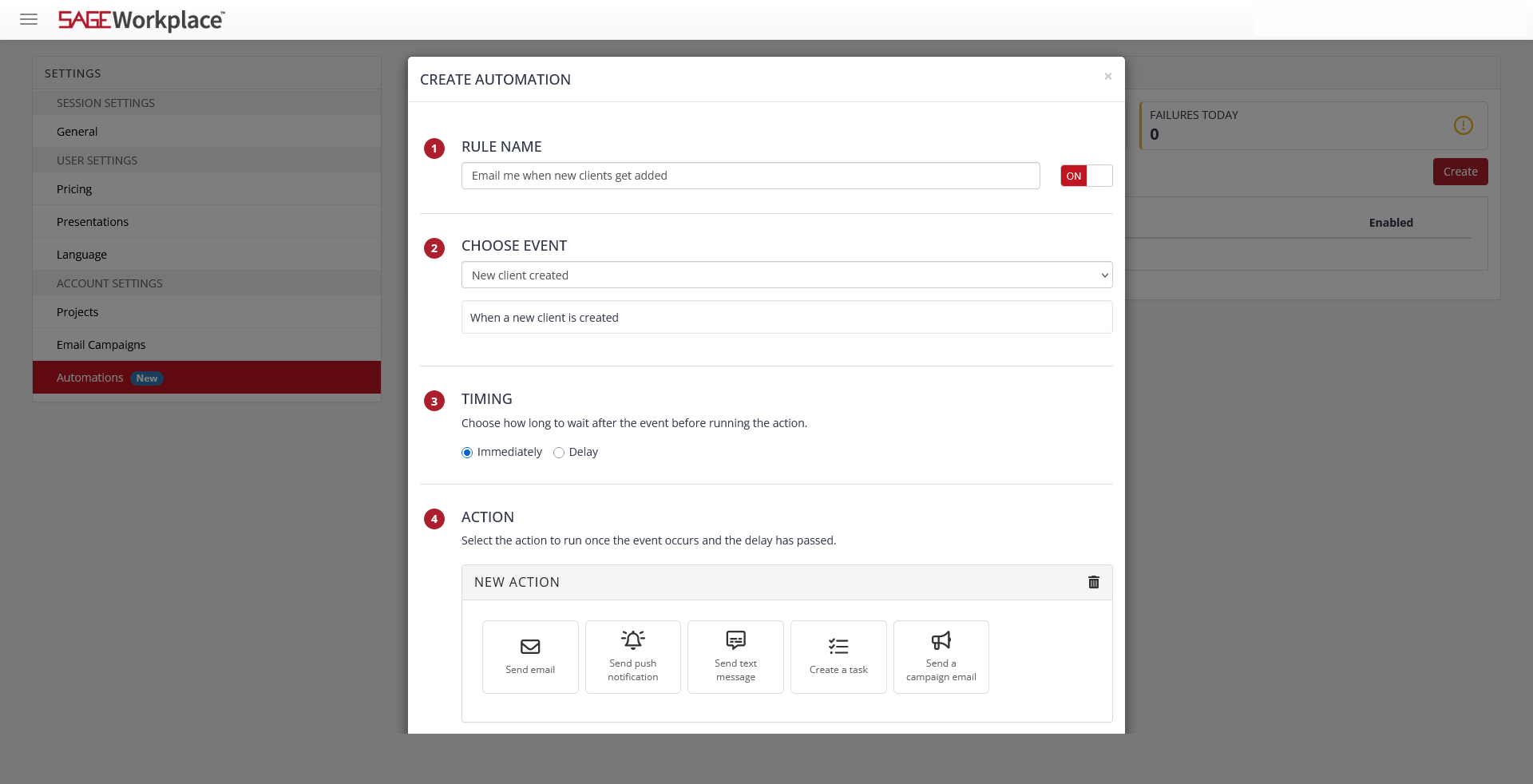
- Create custom automation rules across SAGE modules, pick an event, and define the action that follows.
- Examples include automated notification emails, status alerts, task creation on client interactions, and more, bringing real workflow automation to your day-to-day operations.

SAGE keeps your experience consistent whether you’re using Windows, iOS, Android, or the Web App:
iOS/Android App Updates:
- Product Search
- ColorSense support
- Print on Demand filter
- Advanced search now includes SPC/Item #
- Carbon footprint data
- Direct links to supplier product pages
- Ability to tag all products
- Presentations
- Gallery view for presentations
- Presentation Wizard for quick, ready-made presentation
- Custom body background color
- Option to strikethrough Price and Catalog Price rows
- Header customization with color and image options
- Tag field support in the header or footer text box
- Enhance text to Closing, Header, Footer, and Terms & Conditions
- Automatic client logo placement in Design Studio when a client is selected
- Pricing update option when pricing is outdated
Web App Updates:
- Product Search
- Live Research Assistance using SAGE Chat
- Added supplier resources on supplier & product detail
- Edit Search button at the top of the search results page
- Indicators on “My Supplier Info” & “My Product Info” tabs when notes are present
- Highlighted pricing column based on selected search quantity
- Reset button for shipping estimator defaults
- “EQP” search option for price range quantities
- Edit Search button at the top of the search results page
- Preference group filter for decorator search
- Presentations
- Delete multiple items in a presentation at one time
- Ability to create Catalog Studio publication from presentation
- Ability to create showroom from presentation
- Duplicate presentation items
- Feedback visibility in the presentation edit view
- Automatic client logo placement in Design Studio when a client is selected
- Drag-and-drop reordering of presentation items
Plus more tools to streamline your workflow on every device.

SAGE is pushing the envelope for digital storefronts and online brand experiences:
New Page Builder Widgets
Design your site your way with new widgets and layout tools:
- Countdown Timer — Build urgency for launches or sales
- Quick Search Widget — Help visitors find what they want fast
- Flipbook Widget — Embed catalogs or PDFs visually
- Idea Search — Let visitors explore SAGE AI-generated product ideas
- Icon Widget — Add visual flair with icons
- Code Widget — Insert custom code (e.g., Instagram feed)
Enhanced Reporting Tools
More reporting power means better visibility into revenue and product performance, helping you make smarter decisions.
- New columns including total revenue
- Sales-by-product detailed reporting
Website Inventory & Cart Features
Boost usability and conversion:
- Display real-time inventory (in stock/out of stock)
- Option to hide out-of-stock items
- New cart email alerts for new client registrations
- Cart internal notes to help manage orders
- Updated cart count displays
…so customers have information before they buy, and you stay in the loop.
History Tracking
You can now see exactly what changes SAGE has made to your website or store with a clear history tracking tool. Perfect for teams or agencies that want transparency in updates and edits.
What This Means for Your Business
- Faster workflows with AI-powered tools
- Better presentations and visuals to wow clients
- Deeper insights with enhanced reporting
- More dynamic website & store experiences
Whether you’re pitching to clients, building custom merch, or managing digital storefronts, these SAGE feature updates give you the tools to level up, without complexity.
To learn more about these new features, visit https://www.sageworld.com/events/new-features/.
0 Comments